





Happy holidays and mad-frantic-rush to Christmas Day! (Am I right?)
You’ve got a million things to do in the next few weeks: gifts to buy and wrap, parties to attend, cards to write, the house to decorate – the list goes on and on.
Let me take one thing off your plate:
You know those people on your Christmas list who are absolutely IMPOSSIBLE to buy for? Give them photos!
Especially if you got married this year, welcomed a new member to the family, or have a whole collection of favorite memories from the past year, there’s something really special about giving someone a physical photograph. It’s a gift that doesn’t end up tucked away in a drawer or forgotten in an inbox.
If I took your photos, you can easily order prints right through your online gallery. Or, you’re more than welcome to download your images and send them off to any professional print lab of your choice.
Do me one favor, though, before you press that checkout button:
DOUBLE-CHECK YOUR CROPS!
Let me explain:
Without getting too nerdy, every photograph has an aspect ratio. Basically, that’s the relationship between the width and height of your image. Most modern cameras produce images in a 2:3 ratio. iPhones, on the other hand, typically shoot in a 4:3 ratio by default. I’ll come back to that in a minute!
Here’s where things get tricky: our standard print sizes of 4×6, 5×7, and 8×10 don’t all follow the same aspect ratio as your original photograph.
Confused? It’s okay. Seeing is believing, so let me show you what I mean!
Let’s take this awesome bridal party photo from Ranee and John’s wedding. (Can we just talk about how crazy adorable their flower girl and ring bearer were?!)
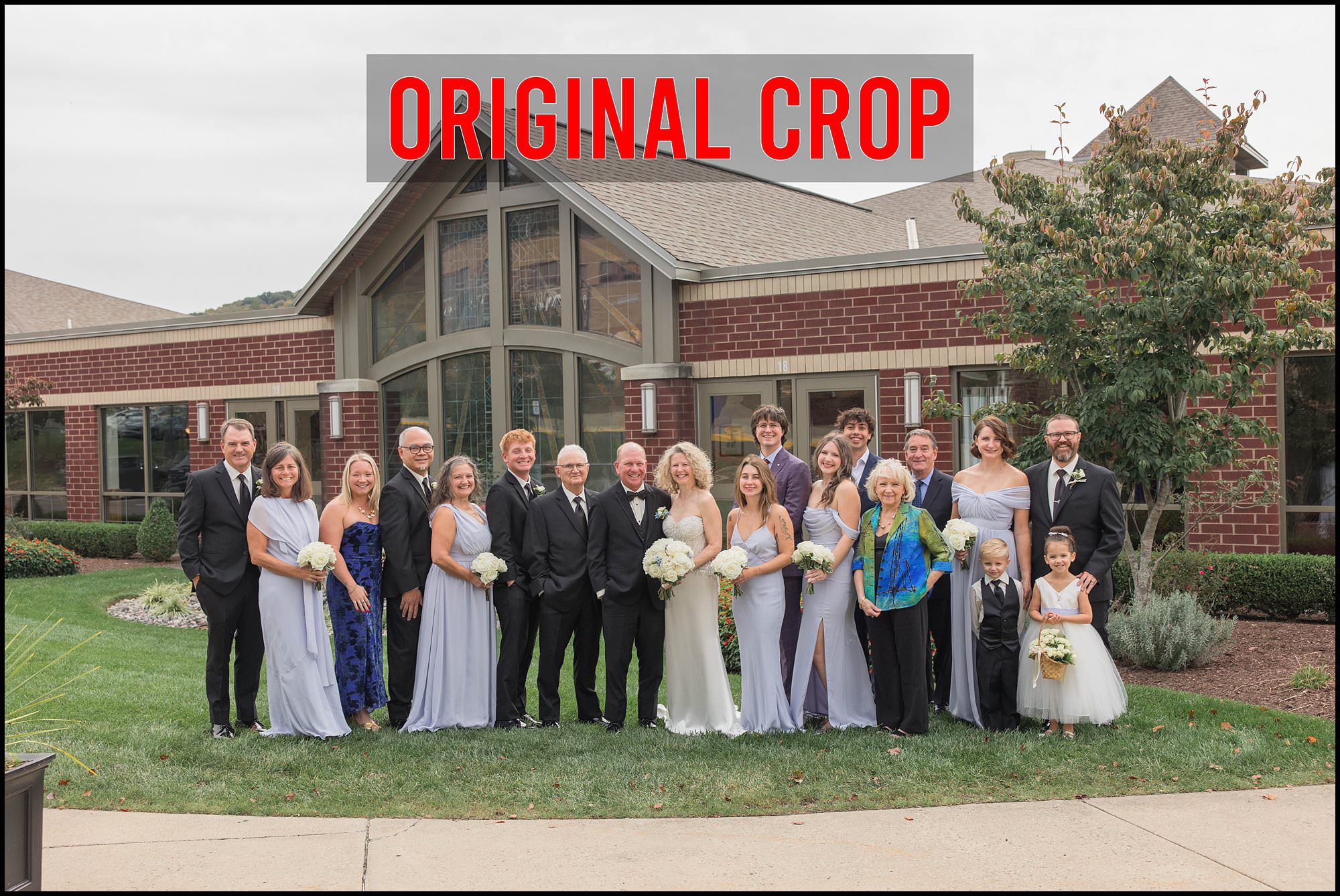
This is the original file straight out of my professional camera. If someone decided to print this image as a 4×6, this is exactly what the image would look like. No cropping necessary!
Okay, so unless you’re the scrapbooking type or you’re simply slipping photos into the plastic sleeves of a pre-made album, you probably aren’t printing a ton of 4×6 photos. If you’re printing images for display, you might be starting with a 5×7 – perfect for a frame on a desk or shelf.
Now, I went ahead and took my original image and cropped it to a 5×7 print.
If you look closely, you’ll notice a tiny bit of the image has been cut off on both sides. You can’t tell? Look at the wooden pews in the original photo above, and then take note of those same wooden pews in the image below.
It’s like one of those “how many differences can you find?” puzzles!
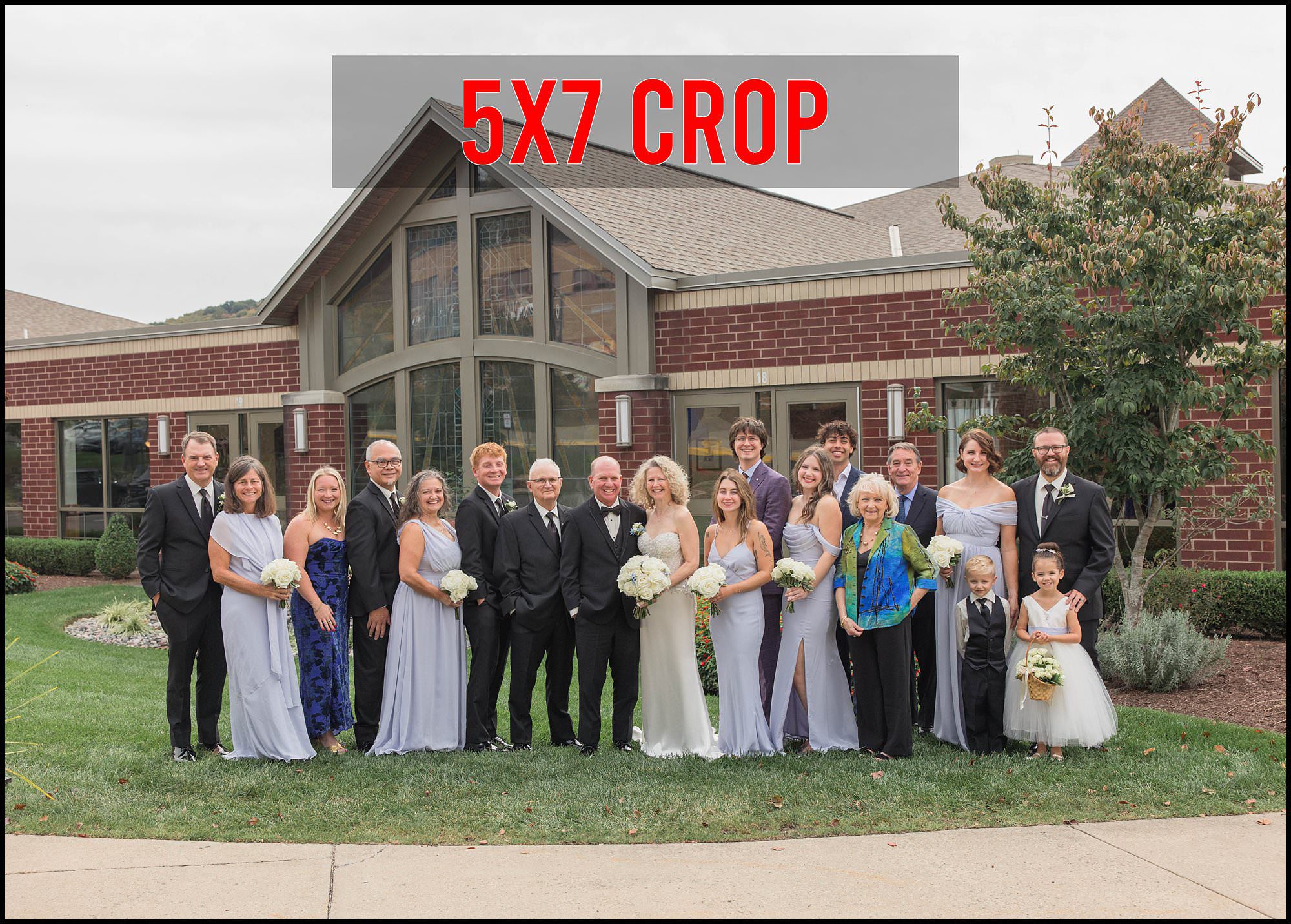
You might say, “Well, Kara, that’s not so bad.” And you’d be correct! The 5×7 crop usually doesn’t cut off too much that’s noticeable.
But then we make the jump from the perfect-for-your-desk size of 5×7 to the hang-on-the-wall size of 8×10.
Notice how much tighter the crop gets on this one? Again, if you can’t quite tell, look at the plants and bushes above and notice how they’re cut in below!
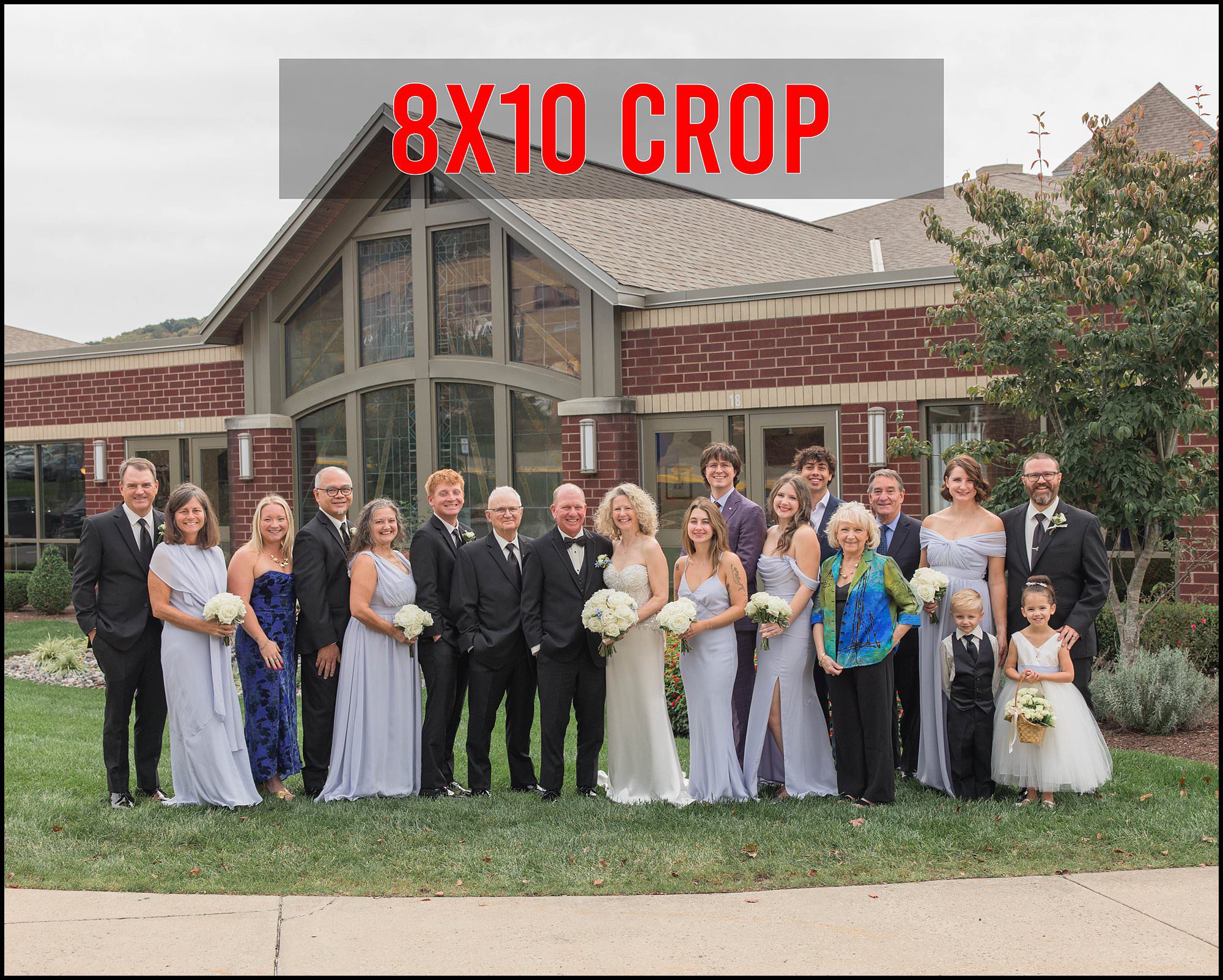
Still a little tricky to see? Let me show you the same image one more time, but instead of actually cropping it, I’ll use lines to show you exactly where each print size would cut off the original image.
If you were struggling to see the differences above, this should clear it all up!
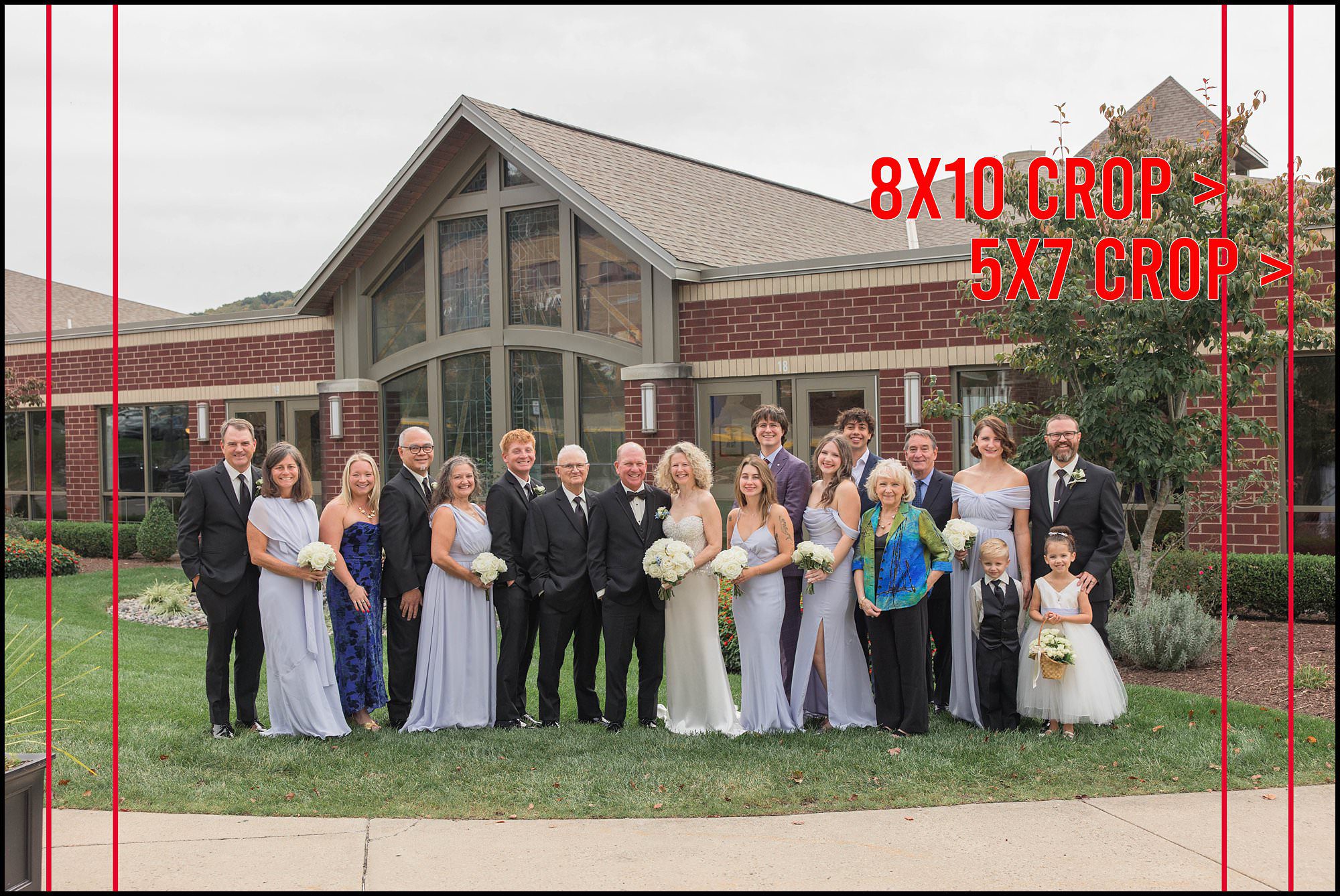
See how much of the original image can disappear depending on the size of the print?
Don’t Forget About Your iPhone Photos!
If you’re printing photos you’ve taken on your iPhone, you have to think about this even further:
Most iPhones shoot photos in a 4:3 aspect ratio by default. That’s different from the 2:3 ratio produced by most modern professional cameras.
What does that mean for printing?
It means your iPhone photos will crop differently than the examples above!
For example, let’s say you took a beautiful family photo on your iPhone and want to print it as a 4×6.
A 4×6 print has a 2:3 aspect ratio, while your original iPhone photo is 4:3. To make those two shapes fit together, the print lab will need to trim a little off the left and right of your photo (or the top and bottom, depending on how you’re holding your phone).
And if you’re printing that same photo as an 8×10, an 8×10 has a 4:5 aspect ratio, which is still little narrower than your original iPhone photo. In other words, the opposite sides get cropped in.
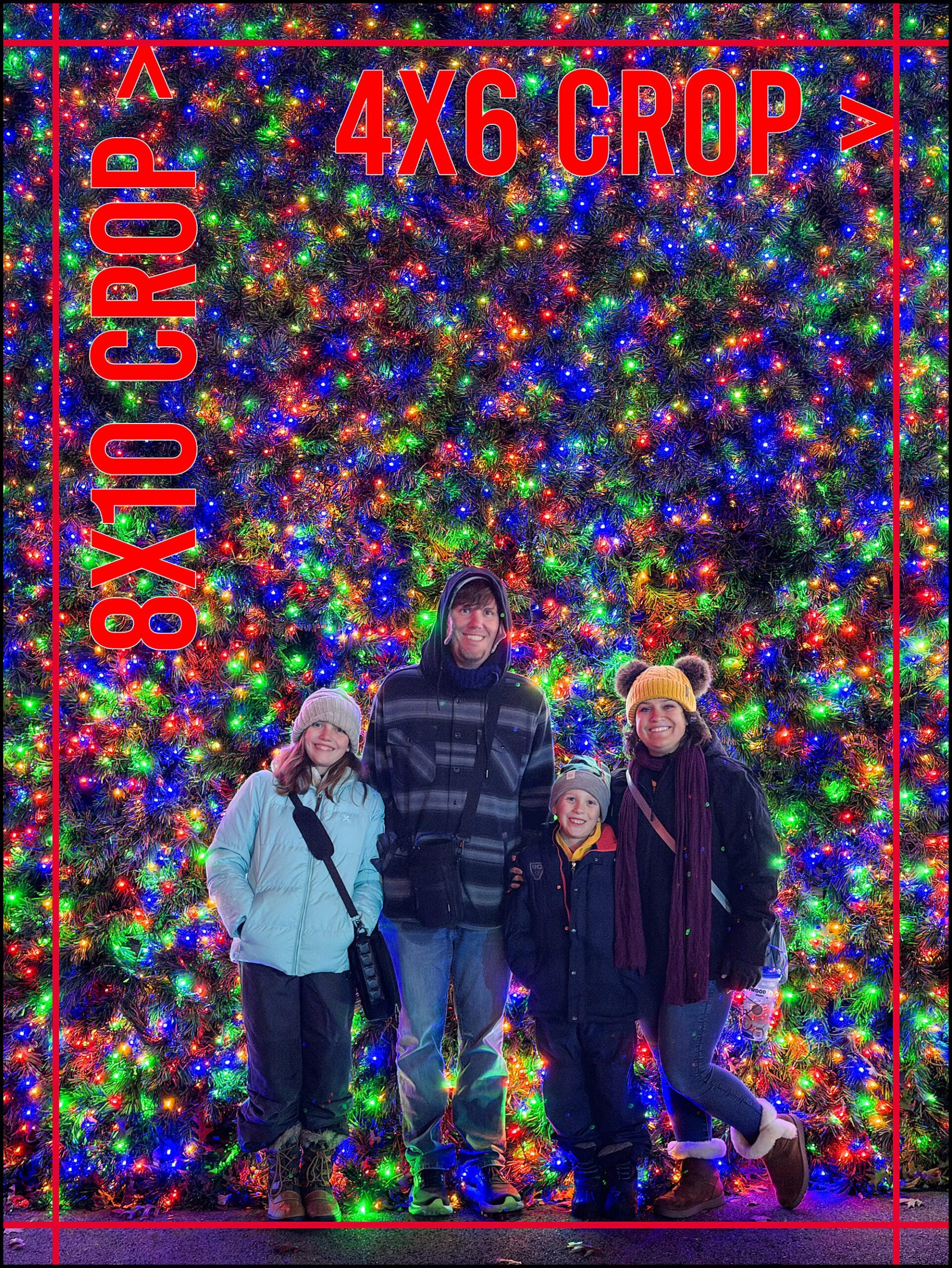
Here’s my advice for iPhone photos:
- Pay especially close attention to the top and bottom of your image when ordering 4×6 prints.
- Check the sides of your image when ordering 8×10 prints.
- If you’re printing a photo with a lot of people in it, make sure nobody is getting accidentally cut out!
- If your photo is especially important to you, consider cropping it yourself before uploading it, so you have more control over the final result.
One more thing: if you’ve changed your iPhone camera settings to shoot in 16:9 instead of the standard 4:3, your photos will have an entirely different crop to consider.
Every Time You Have Photos Printed, CHECK THE CROP!
No matter where you order your photos, take a minute to look at the print preview before completing your order.
Most online print labs have an automatic “fill” or cropping option. They’ll adjust your image to fit the print size you’ve selected, but they don’t necessarily know what’s important to you in the photograph.
And here’s where the tricky part comes in: it’s up to YOU to double-check that the crop looks right.
Sometimes a photo won’t look back with the crop, but if the main subjects are slightly off center, you might need to move the crop in order to not cut someone’s shoulder off.
On Ranee and John’s wedding day, if I had taken just two steps closer to the group when I took their group photo, the 8×10 crop would have cut right into the bridesmaids and groomsmen on the outside of the group.
In other words, NOW YOU KNOW why I always do my best to leave a little breathing room around the edges of your images, especially when photographing large family groups!
Sometimes it simply can’t be helped, but whenever possible, I try to leave that extra space so you have the flexibility to print your images in whatever size and aspect ratio your little heart desires.
Because I want you to be able to enjoy your photos in print, not just on a screen!
Alright, aspect ratio lesson over.
GO PRINT YOUR PHOTOS!
Seriously! Pull out those wedding photos, your favorite family pictures, or that collection of iPhone photos you’ve been meaning to do something with:
Print them, frame them, wrap them up, and give them to someone you love.
And when you do, I’d love it if you’d share a photo of your printed products on social media and tag me so I can see!